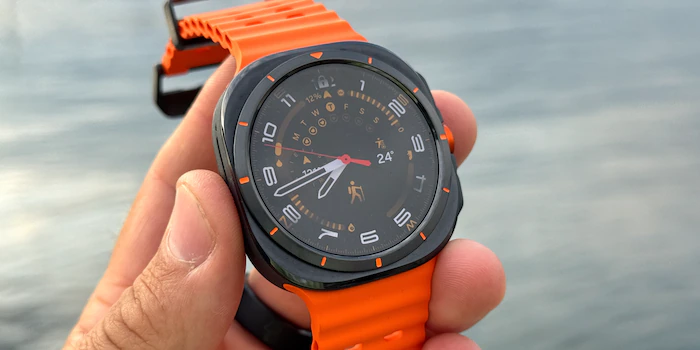
Samsung has launched the first public beta of One UI 8 Watch, offering Galaxy Watch7 and Galaxy Watch Ultra owners an exclusive preview of upcoming features. This beta program, currently available in the US and South Korea, precedes the official July rollout for all Galaxy Watch models from the Galaxy Watch5 onwards. Typically, Samsung expands beta availability to other regions shortly after the initial US release, and interested users can sign up through the One UI Beta Program.
Enhanced User Experience and Smart Features
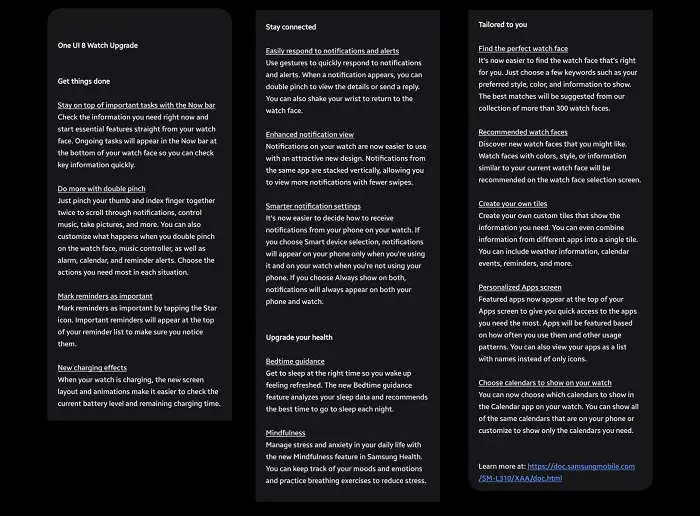
The 1.8 GB update to One UI 8 Watch brings a range of enhancements beyond the previously announced health features. A notable improvement is the smarter home screen, which now prioritizes six frequently used apps for quick access, though this can be customized. Users also have the option to display their apps as an alphabetically sorted list instead of the traditional grid layout. Furthermore, the new “Now Bar” provides a convenient way to view current background activities, similar to the functionality seen on the Galaxy S25. For added convenience, a “double-pinch” gesture can be assigned to trigger a pre-selected function.
Intuitive Interactions and Health Monitoring
One UI 8 Watch introduces several intuitive interactions aimed at improving daily usability. A new charging animation provides visual feedback when your Galaxy Watch is connected to its charger. For improved organization, reminders can now be marked as “important” with a star, ensuring they appear at the top of your list. Managing notifications is also made easier with the ability to dismiss them by shaking your wrist. To keep your notification feed cleaner, One UI 8 Watch now stacks multiple notifications from the same app, providing a more streamlined view. While not detailed in this beta release, the official One UI 8 Watch update is expected to include advanced health features like the antioxidant index.
Joining the One UI 8 Watch Beta Program
To enter the One UI 8 Watch beta program for your Samsung Galaxy Watch 7 (or Watch Ultra), you generally need to follow these steps:
- Ensure you meet the criteria:
- You need to have a Galaxy Watch 7 or Galaxy Watch Ultra. (While One UI 8 Watch will eventually come to other models, the beta is currently limited to these two.)
- You must be in a supported region. Currently, the beta is primarily available in the US and South Korea. Samsung typically expands availability to other countries later.
- Your Galaxy Watch needs to be paired with a Samsung Galaxy phone.
- Make sure you are signed into your Samsung Account on both your phone and your watch.
- Update the Samsung Members app:
- Download and install the Samsung Members app from the Galaxy Store or Google Play Store on your connected Galaxy phone.
- Ensure the app is updated to its latest version.
- Register for the Beta Program:
- Open the Samsung Members app.
- Look for a banner or notification for the One UI 8 Watch Beta Program on the home screen. It might be a prominent banner or within a “Notices” or “Beta Program” section. Samsung has recently streamlined the beta program section to be more easily visible at the bottom of the Members app homepage.
- Tap on the banner/notification and select “Register” or “Enroll” to sign up for the beta.
- Complete and submit the intention to participate.
- Install the Beta Software:
- Once your registration is processed (which might take a few minutes), go to the Galaxy Wearable app on your phone.
- Navigate to Watch settings > Watch software update > Download and install.
- You should see the One UI 8 Watch beta update available for download.
- Follow the on-screen instructions to download and install the update. The download size can be substantial (around 1.8GB or more), and it’s recommended to be on Wi-Fi.
Important Notes:
- Backup your data: Beta software can sometimes be unstable and may lead to data loss. It’s highly recommended to back up your watch data using the Smart Switch PC version before installing the beta.
- Beta status: Remember that this is beta software, so you might encounter bugs, performance issues, or features that don’t work as expected.
- Provide feedback: Samsung encourages beta participants to provide feedback on bugs and suggestions through the Samsung Members app. This helps them improve the final software.
- Availability: Beta programs are often rolled out in phases and may have limited slots. If you don’t see the option immediately, keep checking the Samsung Members app.
By following these steps, you should be able to join the One UI 8 Watch beta program and experience the new features on your Galaxy Watch 7 or Watch Ultra.
You May Also Like To Check: The New and latest Smartwatches 2025