Huawei is rolling out a new firmware update, version 5.1.0.211(SP5C00M02), for its Watch Fit 4 and Fit 4 Pro smartwatches. This update brings a range of new features and optimizations aimed at improving the user experience.
Enhanced User Interface and App Design
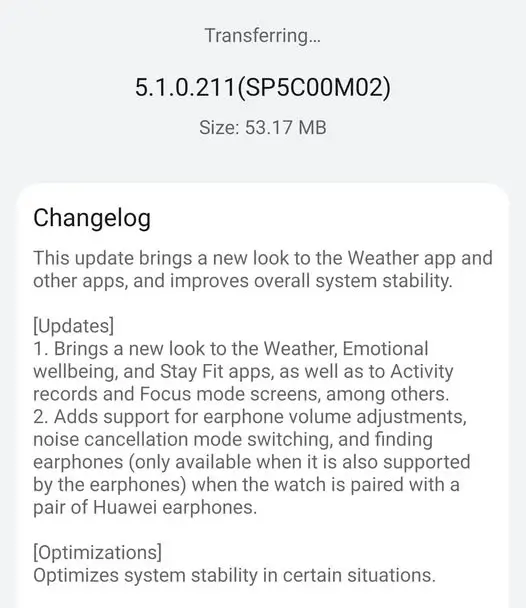
A key highlight of this firmware is the visual refresh it provides to several core applications. Users will discover a new look for the Weather, Emotional wellbeing, and Stay Fit apps, making them more aesthetically pleasing and easier to navigate. The update also redesigns the Activity records and Focus mode screens, providing a cleaner and more modern interface for these essential functions.
Improved Earphone Integration
For those who use their Huawei Watch Fit 4 or Fit 4 Pro with Huawei earphones, this update introduces a new level of control. The smartwatch now supports earphone volume adjustments, noise cancellation mode switching, and a helpful “find earphones” feature. This functionality enhances the seamless interaction between your watch and audio accessories, making it more convenient to manage your music and calls directly from your wrist. The “find earphones” feature is only available with compatible earphone models.
System Stability Optimizations
Beyond the new features, Huawei has also focused on improving the overall performance of the smartwatches. The update includes a number of optimizations to enhance system stability in certain situations, ensuring a smoother and more reliable experience for users during daily use.
How to Update Your Watch
The update is being released in phases, so not all users will receive it at the same time. If you haven’t received the notification yet, you may need to wait a few days. To check for the update manually, you can use the Huawei Health app on your phone. Simply open the app, navigate to the device details screen for your watch, and then tap on “Firmware update.” The app will check for any available updates and prompt you to install them. Make sure your watch has at least a 45% charge before beginning the update process.
You May Also Like To Check Out: The New and Latest Smartwatches 2025