For athletes who rely on structured training, the bridge between a coaching app and a GPS watch is the most critical part of their gear. In a significant move for the fitness tech community, Runna has officially launched its integration with Amazfit. This partnership allows runners to ditch manual lap-button pressing and paper-thin training plans in favor of a seamless, automated digital ecosystem.
Two-Way Synchronization: How the Partnership Works
The core of this update is the “full-loop” data exchange between the Runna app and Zepp Health’s ecosystem. Rather than just sending data one way, the integration ensures a constant dialogue between your phone and your wrist.
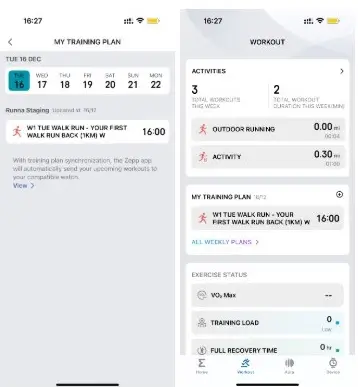
When you schedule a session in Runna, it is automatically beamed to the Zepp app and synced to your Amazfit device. Once you hit “save” at the end of your route, the performance metrics—including heart rate, pace, and elevation—flow back into Runna. This allows the app’s algorithms to analyze your progress and adjust your future training intensities accordingly.
Initial Device Support and Requirements
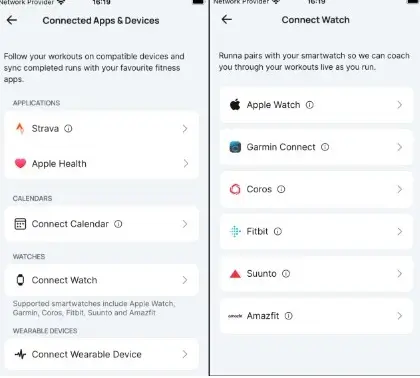
To maintain a high standard of stability, the rollout is starting with a focused group of devices. Currently, the integration is live for:
-
Amazfit Balance 2
-
Amazfit T-Rex 3 Pro
While these flagship models are leading the charge, Runna has indicated that more devices within the Amazfit lineup will be added incrementally. To access these features, users must ensure their Runna app is updated to version 8.21.0 or higher. If you own a different model, you can check for compatibility directly within the “Training Plan” section of the Zepp app.
Pro Tips for the Best Tracking Experience
To get the most out of this new integration, a few manual adjustments to your watch settings are recommended. Because Runna utilizes sophisticated interval structures, standard watch “auto-features” can sometimes interfere.
-
Disable Auto-Lap: This prevents the watch from marking a lap every mile or kilometer, which can ruin the data for a specific 800m or 1km interval.
-
Turn Off Auto-Pause: During rest intervals, your watch might think you’ve stopped running and pause the workout. Disabling this ensures your recovery periods are timed accurately.
-
Enable Audio Cues: If your model supports it, turning on voice prompts will allow your watch to “coach” you through pace changes and split times in real-time.
Current Limitations and Future Roadmap
While this is a major leap forward, the integration is currently focused exclusively on running activities. If your Runna plan includes strength training or mobility work, these sessions will stay within the app for now and won’t sync to the watch.
Additionally, Runna is working on expanding its ecosystem beyond its current location. While Polar users are still waiting for full workout syncing, that functionality is expected to arrive later this year. For Amazfit users, this launch is just the beginning of a broader collaboration aimed at making professional-grade coaching accessible to every type of runner. For more information, please visit the Runna support page.
You May Also Like To Check Out: The New and Latest Smartwatches 2025